Sunday, November 28, 2010

Why Everyone's Talking about Twitter


If you ever fancied yourself a blogger but didn't have the time or energy to post thoughtful or silly missives at regular intervals, a new service called Twitter could set your inner blogger free. While some people call it microblogging or moblogging, I like to think of Twitter simply as blogging for regular people.
Maybe you're really busy. Maybe you don't have much to say. Or maybe you're just lazy. Not a problem. This free service works by letting you broadcast a group text message to your friends' mobile phones from either your own phone, an instant message or an online form at twitter.com. All your notes are then stored and displayed on your personal profile page on the site, which includes links to your friends' Twitter pages, a thumbnail picture of your choice, and a short bio. You can even send text updates directly to your MySpace page. Just remember to keep it short: posts are limited to 140 characters, and the topic is, invariably, "what are you doing?''

Twitter is a real-time information network that connects you to the latest information about what you find interesting. Simply find the public streams you find most compelling and follow the conversations.

Twitter is ranked as one of the 10 most visited websites worldwide by Alexa's web traffic  analysis. Daily user estimates vary as the company does not publish statistics on active accounts. A February 2009 Compete.com blog entry ranked Twitter as the third most used social network based on their count of 6 million unique monthly visitors and 55 million monthly visits. In March 2009, a Nielsen.com blog ranked Twitter as the fastest-growing website in the Member Communities category for February 2009. Twitter had a monthly growth of 1,382%, increasing from 475,000 unique visitors in February 2008 to 7 million in February 2009. It was followed by Zimbio with 240% increase, and Facebook with 228% increase. However, Twitter has a user retention rate of 40%

The Galaxy Pad as an iPad Challenger

Samsung has reportedly decided on the final name its first Android tablet  will have: Samsung Galaxy Pad.

However, according to Korean site, this name will be used for certain only in South Korea – in other markets, the tablet may be called something else (maybe Galaxy Tab, as rumored until now).
Apparently, Samsung works on two versions of the tablet: a 7 inch one (seen in the photo below) and a 10 inch one.
As previously reported, the tablet will run Android 2.2 Froyo and feature 3G, Wi-Fi, GPS, 3.2MP photo camera, front-facing camera for video calling, and a 1GHz CPU.
The screen resolution is said to be 800 x 480. Now, WVGA may be a decent resolution for a 7-inch display, but for a 10 inch display the pixel density would be too low. So I’m thinking the 10 inch Samsung Android tablet won’t run Froyo, but Gingerbread – since Froyo doesn’t support resolutions higher than WVGA, while Gingerbread apparently will. This could also mean that only the 7 inch tablet will be announced in early September (presumably during IFA in Berlin), while the 10 inch Gingerbread tablet will likely be out next year. Of course, this is pure speculation – we’ll provide updates on the matter as soon as more info becomes available.

iPad


IPad-02.jpg

The iPad is a tablet computer designed and developed by Apple. It is particularly marketed as a platform for audio and visual media such as books, periodicals, movies, music, and games, as well as web content. At about 1.5 pounds (680 grams), its size and weight are between those of most contemporary smarphones and laptop computers. Apple released the iPad in April 2010, and sold 3 million of the devices in 80 days.

According to a report released by Strategy Analytics, the Apple iPad has gained a 95 percent share sales of Tablet PC at the end of second quarter 2010. And during the second quarter 2010, Apple had sold 4.19 million iPads around the world.
The iPad runs the same operating system as the earlier iPod Touch and iPhone. It can run its own applications as well as ones developed for the iPhone. Without modification, it will only run programs approved by Apple and distributed via its online store.
Like iPhone and iPod Touch, the iPad is controlled by a multitouch display — a break from most previous tablet computers, which used a pressure-triggered stylus. The iPad uses a Wi-Fi data connection to browse the Internet, load and stream media, and install software. Some models also have a 3G wireless data connection which can connect to GSM 3G data networks. The device is managed and synced by iTunes on a personal computer via USB cable.
Media reaction to the device has generally been neutral or positive, with more positive reaction after the device was launched.


History
Apple's first tablet computer was the Newton  MessagePad 100, introduced in 1993, which led to the creation of the ARM6processor core with Acorn Compuers. Apple also developed a prototype PowerBook Duo-based tablet, the PenLite, but in order to avoid hurting MessagePad sales did not sell it. Apple released several more Newton-based PDAs, and discontinued the last, theMessagePad 2100, in 1998.
With the success of the introduction of portable music player iPod  in 2001, Apple re-entered the mobile-computing market in 2007 with the iPhone . Smaller than the iPad but featuring a camera and mobile phone, it pioneered the multitouch finger-sensitive touchscreen interface of Apple's mobile operating system—iOS. By late 2009, the iPad's release had been rumored for several years. Mostly referred to as "Apple's tablet", iTablet and iSlate were among the speculated names. The iPad was announced on January 27, 2010 by Steve Jobs at an Apple press conference at the Yerba Buena Center for the Arts in San Francisco.
Jobs later admitted that the iPad was developed before the iPhone. Upon realizing that it would work just as well as a mobile phone, Jobs put development of the iPad on hold and decided to develop the iPhone instead.

Screen and input
The iPad's touchscreen display is a 9.7 in (25 cm) liquid crystal display (1024 × 768 pixels) with fingerprint-resistant and scratch-resistant glass. Like the iPhone, the iPad is designed to be controlled by bare fingers; normal gloves and styli that prevent electrical conductivity may not be used, although there are special gloves and capacitive styli designed for this use.
The display responds to two other sensors: an ambient light sensor to adjust screen brightness and a 3-axis accelermeter to sense iPad orientation and switch between portrait and landscape modes. Unlike the iPhone and iPod touch built-in applications, which work in three orientations (portrait, landscape-left and landscape-right), the iPad built-in applications support screen rotationin all four orientations (the three aforementioned ones along with upside-down), meaning that the device has no intrinsic "native" orientation; only the relative position of the home button changes.
The iPad has a switch to lock out the screen rotation function (reportedly to prevent unintended rotation when the user is lying down). There are a total of four physical switches, including a home button below the display that returns the user to the main menu, and three plastic physical switches on the sides: wake/sleep and volume up/down, along with the screen rotation lock.
Ars Technica noted the similarity between the iPad and Star Trek's fictional PADD tablet computer, both in name and functionality.

Connectivity
Steve Jobs, Apple CEO, introducing the iPad
The iPad can use Wi-Fi network trilateration from Skyhook Wireless to provide location information to applications such as Google Map. The 3G model contains A-GPS to allow its position to be calculated with GPS or relative to nearby cellphone towers; it also has a black plastic accent on the back side to improve 3G radio sensitivity.
For wired connectivity, the iPad has the proprietary Apple Dock Connector; it lacks the Ethernet of larger computers, and USB of mobile devices.

Audio and output
Back of the iPad 3G
The iPad has two internal speakers that push mono sound through two small sealed channels to the three audio ports carved into the bottom-right of the unit. A volume switch is on the right side of the unit.
A 3.5-mm TRS connector audio-out jack on the top-left corner of the device provides stereo sound for headphones with or without microphones and/or volume controls. The iPad also contains a microphone that can be used for voice recording.
The built-in Bluetooth 2.1 + EDR interface allows wireless headphones and keyboards to be used with the iPad. However, the iOS does not currently support file transfer via Bluetooth. iPad also features 1024 x 768 VGA video output for connecting an external display or television.

Applications
The iPad comes with several applications, including Safari, Mail, Photos, Video, YouTube, iPod, iTunes, App Store, iBooks, Maps, Notes, Calendar, Contacts, and Spotlight Search. Several are improved versions of applications developed for the iPhone.
The iPad syncs with iTunes on a Mac or Windows PC. Apple ported its iWork suite from the Mac to the iPad, and sells pared down versions of Pages, Number, and Keytone apps in the App Store. Although the iPad is not designed to replace a mobile phone, a user can use a wired headset or the built-in speaker and microphone and place phone calls over Wi-Fi or 3G using a VoIP application. The iPad has lots of third party applications available for it; as of September 1, 2010 there were 25000 iPad specific apps on the AppStore.

Tuesday, November 16, 2010

Another is GPS


The Global Positioning System (GPS) is a satellite-based navigation system made up of a network of 24 satellites placed into orbit by the U.S. Department of Defense. GPS was originally intended for military applications, but in the 1980s, the government made the system available for civilian use. GPS works in any weather conditions, anywhere in the world, 24 hours a day. There are no subscription fees or setup charges to use GPS.

How it works

GPS satellites circle the earth twice a day in a very precise orbit and transmit signal information to earth. GPS receivers take this information and use triangulation to calculate the user's exact location. Essentially, the GPS receiver compares the time a signal was transmitted by a satellite with the time it was received. The time difference tells the GPS receiver how far away the satellite is. Now, with distance measurements from a few more satellites, the receiver can determine the user's position and display it on the unit's electronic map.
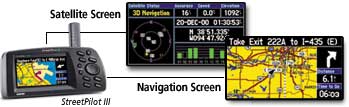
GPS Screens
A GPS receiver must be locked on to the signal of at least three satellites to calculate a 2D position (latitude and longitude) and track movement. With four or more satellites in view, the receiver can determine the user's 3D position (latitude, longitude and altitude). Once the user's position has been determined, the GPS unit can calculate other information, such as speed, bearing, track, trip distance, distance to destination, sunrise and sunset time and more.

How accurate is GPS?

Today's GPS receivers are extremely accurate, thanks to their parallel multi-channel design. Garmin's 12 parallel channel receivers are quick to lock onto satellites when first turned on and they maintain strong locks, even in dense foliage or urban settings with tall buildings. Certain atmospheric factors and other sources of error can affect the accuracy of GPS receivers. Garmin® GPS receivers are accurate to within 15 meters on average.
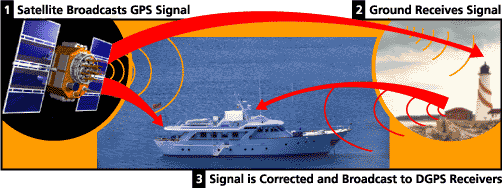
GPS Signals
Newer Garmin GPS receivers with WAAS (Wide Area Augmentation System) capability can improve accuracy to less than three meters on average. No additional equipment or fees are required to take advantage of WAAS. Users can also get better accuracy with Differential GPS (DGPS), which corrects GPS signals to within an average of three to five meters. The U.S. Coast Guard operates the most common DGPS correction service. This system consists of a network of towers that receive GPS signals and transmit a corrected signal by beacon transmitters. In order to get the corrected signal, users must have a differential beacon receiver and beacon antenna in addition to their GPS.
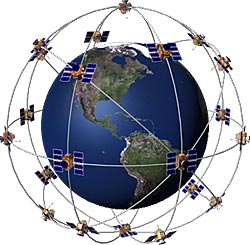
Satellite Diagram

The GPS satellite system

The 24 satellites that make up the GPS space segment are orbiting the earth about 12,000 miles above us. They are constantly moving, making two complete orbits in less than 24 hours. These satellites are travelling at speeds of roughly 7,000 miles an hour.
GPS satellites are powered by solar energy. They have backup batteries onboard to keep them running in the event of a solar eclipse, when there's no solar power. Small rocket boosters on each satellite keep them flying in the correct path.
Here are some other interesting facts about the GPS satellites (also called NAVSTAR, the official U.S. Department of Defense name for GPS):
  • The first GPS satellite was launched in 1978.
  • A full constellation of 24 satellites was achieved in 1994.
  • Each satellite is built to last about 10 years. Replacements are constantly being built and launched into orbit.
  • A GPS satellite weighs approximately 2,000 pounds and is about 17 feet across with the solar panels extended.
  • Transmitter power is only 50 watts or less.

What's the signal?

GPS satellites transmit two low power radio signals, designated L1 and L2. Civilian GPS uses the L1 frequency of 1575.42 MHz in the UHF band. The signals travel by line of sight, meaning they will pass through clouds, glass and plastic but will not go through most solid objects such as buildings and mountains.
A GPS signal contains three different bits of information - a pseudorandom code, ephemeris data and almanac data. The pseudorandom code is simply an I.D. code that identifies which satellite is transmitting information. You can view this number on your Garmin GPS unit's satellite page, as it identifies which satellites it's receiving.
Ephemeris data, which is constantly transmitted by each satellite, contains important information about the status of the satellite (healthy or unhealthy), current date and time. This part of the signal is essential for determining a position.
The almanac data tells the GPS receiver where each GPS satellite should be at any time throughout the day. Each satellite transmits almanac data showing the orbital information for that satellite and for every other satellite in the system.
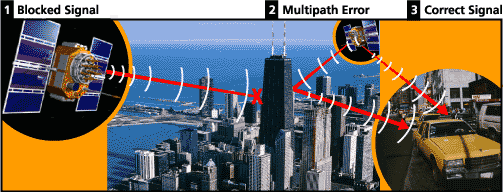
Blocked Signal Diagram

Sources of GPS signal errors

Factors that can degrade the GPS signal and thus affect accuracy include the following:
  • Ionosphere and troposphere delays - The satellite signal slows as it passes through the atmosphere. The GPS system uses a built-in model that calculates an average amount of delay to partially correct for this type of error.
  • Signal multipath - This occurs when the GPS signal is reflected off objects such as tall buildings or large rock surfaces before it reaches the receiver. This increases the travel time of the signal, thereby causing errors.
  • Receiver clock errors - A receiver's built-in clock is not as accurate as the atomic clocks onboard the GPS satellites. Therefore, it may have very slight timing errors.
  • Orbital errors - Also known as ephemeris errors, these are inaccuracies of the satellite's reported location.
  • Number of satellites visible - The more satellites a GPS receiver can "see," the better the accuracy. Buildings, terrain, electronic interference, or sometimes even dense foliage can block signal reception, causing position errors or possibly no position reading at all. GPS units typically will not work indoors, underwater or underground.
  • Satellite geometry/shading - This refers to the relative position of the satellites at any given time. Ideal satellite geometry exists when the satellites are located at wide angles relative to each other. Poor geometry results when the satellites are located in a line or in a tight grouping.
  • Intentional degradation of the satellite signal - Selective Availability (SA) is an intentional degradation of the signal once imposed by the U.S. Department of Defense. SA was intended to prevent military adversaries from using the highly accurate GPS signals. The government turned off SA in May 2000, which significantly improved the accuracy of civilian GPS receivers.

Stuff to Shoot Nowadays..

Photography is undoubtedly one of the most important inven­tions in history -- it has truly transformed how people conceive of the world. Now we can "see" all sorts of things that are actually many miles -- and years -- away from us. Photography lets us capture moments in time and preserve them for years to come.


The basic technology that makes all of this possible is fairly simple. A still film camera is made of three basic elements: an optical element (the lens), a chemical element (the film) and a mechanical element (the camera body itself). As we'll see, the only trick to photography is calibrating and combining these elements in such a way that they record a crisp, recognizable image.
There are many different ways of bringing everything together. In this article, we'll look at a manual single-lens-reflex (SLR) camera. This is a camera where the photographer sees exactly the same image that is exposed to the film and can adjust everything by turning dials and clicking buttons. Since it doesn't need any electricity to take a picture, a manual SLR camera provides an excellent illustration of the fundamental processes of photography.


The optical component of the camera is the lens. At its simplest, a lens is just a curved piece of glass or plastic. Its job is to take the beams of light bouncing off of an object and redirect them so they come together to form a real image -- an image that looks just like the scene in front of the lens.
But how can a piece of glass do this? The process is actually very simple. As light travels from one medium to another, it changes speed. Light travels more quickly through air than it does through glass, so a lens slows it down.
When light waves enter a piece of glass at an angle, one part of the wave will reach the glass before another and so will start slowing down first. This is something like pushing a shopping cart from pavement to grass, at an angle. The right wheel hits the grass first and so slows down while the left wheel is still on the pavement. Because the left wheel is briefly moving more quickly than the right wheel, the shopping cart turns to the right as it moves onto the grass.
diagram of shopping cart, which illustrates bending light
The effect on light is the same -- as it enters the glass at an angle, it bends in one direction. It bends again when it exits the glass because parts of the light wave enter the air and speed up before other parts of the wave. In a standard converging, or convex lens, one or both sides of the glass curves out. This means rays of light passing through will bend toward the center of the lens on entry. In a double convex lens, such as a magnifying glass, the light will bend when it exits as well as when it enters.
lens diagram
This effectively reverses the path of light from an object. A light source -- say a candle -- emits light in all directions. The rays of light all start at the same point -- the candle's flame -- and then are constantly diverging. A converging lens takes those rays and redirects them so they are all converging back to one point. At the point where the rays converge, you get a real image of the candle. In the next couple of sections, we'll look at some of the variables that determine how this real image is formed.­

Canon 7D External Buttons | Canon 7D Video Lessons DVD